Delivery schedule/JIT delivery schedule integration

SEQJIT

If only forecast delivery schedules are sent from the customer scheduling agreement (no JIT delivery schedules) JIT delivery schedules can be generated from the JIT calls.
Using this method, you are given the option of (manually) comparing the planning (FDS) with the JIT calls.

JIT inbound actions (SeqJC, SumJC)

The action is a part of call control. It has a logistical or technical effect on a components group. This may be the printing of a components list or the creation of a delivery, for example. You can define the internal processing status of the components group for which an action is permitted and the internal processing status the components group is to receive once the action has been carried out. Actions can be triggered by:

  • An incoming JIT call by EDI and an external status change.
  • A user dialog in the system, such as a progress confirmation.

Integration

  • You define the possible actions in Customizing for JIT Inbound. You can use the standard actions provided or define your own actions. If the actions you have defined yourself:
    1. Simply cause a change in the internal processing status, you can enter them in Customizing in the table.
    2. Trigger a function as well as changing the internal processing status, you can use a customer exit.
  • You define the possible actions in Customizing for JIT Outbound. Internal actions can only be triggered when you receive a call by EDI or with internal system activities and not in a user dialog.
  • You can also interlink actions in Customizing. The system then carries out two or more actions together.

Features

The system provides the following actions as standard
(the code of actions kept in the functional modules):

Action Function Description
Actions for Creating and Changing
CREA Create JIT call The system creates the call in the system and arranges it in the call structure. This action is usually triggered by a forecast signal from the OEM.
MODI Change JIT call (total) The system changes the total call.
The action MODI is contained in action PIN. See also: Action PIN.
MODH Change call (call header and components group) With the external status change, for example, the system changes only the call header and the components groups.

Read the rest of this article

ABAP: Deny action on JIT-calls processing


ENHANCEMENT-POINT YPDENY_OFIN SPOTS YDENY_OFIN .
if ( chained_action_iv eq 'XX20' or chained_action_iv eq 'XX30' ) and action_iv = action_outbound_finish_gc. "OFIN
data: begin of it_benum occurs 0,
outpo type ltak-benum,
end of it_benum,
begin of lt_benum occurs 0,
outpo type SYCHAR50,
end of lt_benum.
loop at jitodiaco_ct into wa_jito.
append wa_jito-outpo to it_benum.
endloop.

select ltak~tanum from ltak inner join ltap
on ltak~tanum eq ltap~tanum into table lt_benum
for all entries in it_benum[] where ltak~benum = it_benum-outpo and ltap~pquit = 'X' and ltap~vorga <> 'ST' and ltap~vorga <> 'SL'. "ST/SL - should not be cancelled
if sy-subrc eq 0.
message s002(Y_SAP).
read table lt_benum into sy-msgv1.

call function 'JITOUT04_FILL_ERROR_TABLE'
exporting
sy = sy
changing
jitodata_cs = jitodata_cs.
message s002(Y_SAP)
with sy-msgv1
raising no_action_done.
endif. "sy-subrc eq 0
endif. "ACTION_IVs

JIT action, mass change planned requirements date

BAdI interface IF_EX_JITO_ACTION.
JIT-action ZDAT creates popup window with date and time fields.

method if_ex_jito_action~customer_action.
"*********************************** jit.sap.sd, 09.2015"
" IMPORTING"
" REFERENCE(ACTION_IV) TYPE CJIT07-AKTION"
" REFERENCE(CHAINED_ACTION_IV) TYPE CHAR1 DEFAULT ' ' "
" REFERENCE(FRAME_ACTION_IV) TYPE CJIT07-AKTION OPTIONAL"
" EXPORTING"
" REFERENCE(STATUS_UPD_DONE_EV) TYPE CHAR1"
" CHANGING"
" REFERENCE(JITODIAHD_CT) TYPE JITODIAHD_TT OPTIONAL"
" REFERENCE(JITODIAIT_CT) TYPE JITODIAIT_TT"
" REFERENCE(JITODIACO_CT) TYPE JITODIACO_TT OPTIONAL"
" REFERENCE(JITOAD_CT) TYPE JITOAD_TT OPTIONAL"
" REFERENCE(JITO_IT_SPEC_CT) TYPE JITO_IT_SPEC_TT OPTIONAL"
" REFERENCE(ASYNC_POSTING_CV) TYPE CHAR1 DEFAULT ' ' "
" REFERENCE(MSSG_RET_CT) TYPE MSSG_RET_TT"
" REFERENCE(JITODATA_CS) TYPE JITODATA OPTIONAL"
" EXCEPTIONS"
" NO_ACTION_DONE"

case action_iv.

"**********************************"

when 'ZDAT'. "Geplantes Bedarfsdatum"
data: l_returncode(1) type c,
ivals type table of sval,
lt_fields type sval,
lv_foop type sval,
lv_xdate type datum,
lv_xtime type uzeit,
ls_jitodiaco type jitodiaco,
lv_timestamp type tzntstmps.

clear: lt_fields.
lt_fields-tabname = 'RKAUF'.
lt_fields-fieldname = 'TODATE'.
lt_fields-value = sy-datum.
lt_fields-field_obl = 'X'.
lt_fields-fieldtext = 'Set the date: '.
append lt_fields to ivals.

clear: lt_fields.
lt_fields-tabname = 'SFSRFW_TIMES'.
lt_fields-fieldname = 'CREATETIME'.
lt_fields-field_obl = 'X'.
lt_fields-value = sy-uzeit.
lt_fields-fieldtext = 'Set the time: '.
append lt_fields to ivals.

call function 'POPUP_GET_VALUES'
exporting
popup_title = 'Planned requirements date'
importing
returncode = l_returncode
tables
fields = ivals
exceptions
error_in_fields = 1
others = 2.

if l_returncode eq 'A' or sy-subrc <> 0.
" lv_error = 'X'."
exit.
else. " √ -ОК-!"
loop at ivals[] into lv_foop.
if lv_foop-fieldname eq 'TODATE'.
lv_xdate = lv_foop-value.
else.
lv_xtime = lv_foop-value.
endif.
endloop.

call function 'CONVERT_INTO_TIMESTAMP'
exporting
i_datlo = lv_xdate
i_timlo = lv_xtime
i_tzone = sy-zonlo
importing
e_timestamp = lv_timestamp.

if jitodiaco_ct[] is not initial.
loop at jitodiaco_ct into ls_jitodiaco.
update jitoit set rdate = lv_timestamp where outpo eq ls_jitodiaco-outpo and intst eq 'XX10'.
endloop.
endif.

endif.

"ZDAT"
endcase.
endmethod.

JIT: How Component group type assignment is done in call components?

sap-blau

How the system will does the job:

The system carries out this function automatically, each time a JIT call is received. In this way it assigns each call component transmitted to a components group type. The components group type then takes on the internal control of the call components.

With sequenced JIT calls for assemblies, the system assigns several call components to the same components group type. With the other call types the call components and the components group type form a logical unit and the system therefore assigns a different components group type to each call component.

In the components group determination the system compares whether the characteristics of the call components match a components group type. As soon as it can assign a call component, it continues with the next one. In the profile for the components group determination you can define with which priority the system should consider the various characteristics. The system determines the relevant characteristics of the call components as follows:

JIT customer

The JIT customer is made up of the sold-to party and the partner description and can therefore be taken from the IDoc.

Unloading point and assembly location

The unloading point and, if necessary the assembly location, are also transmitted with the JIT call. The system can also take these characteristics of the call components from the IDoc.

Components group material

The JIT customer generally transmits the components group material with a call. You have several options for defining the components group material of the call component before the components group determination.

You can realize an individual components group material determination using a customer exit. This is particularly recommended for sequenced JIT calls for assemblies, due to the large number of variants.

If you use the process for discrete materials, you can transfer the material of the call components as a components group material.

If you use the process for discrete materials and exactly one components group material can be assigned to a call component, you can transfer the configurable material of the call component as a components group material. To do this you must have entered the configurable material in the material master of the call component in the tab page Basic data 2 in the field Cross plant conf.mat.

Production version

You can also assign the production version using a customer exit. The production version allows you to assign two otherwise equal call components to different components group types, to produce them on different production lines, for example.

There are also call types – please follow the below link:

Call Structure and Call Types

JIT inbound from scratch proccess IMG

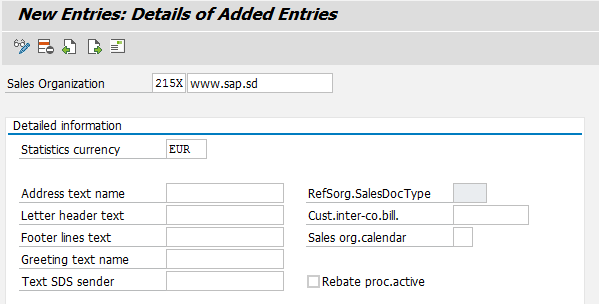
First of all we’ll create a plant, and then – sales organization:

SPRO > Enterprise structure > Definition > Define, copy, delete, check sales organization

img_56151a2c1b378

Checking SPRO – step by step:

Creating Reconciliation Account in General Ledger (FS00):

In OX19 please assign Control area to Control company (new entries).

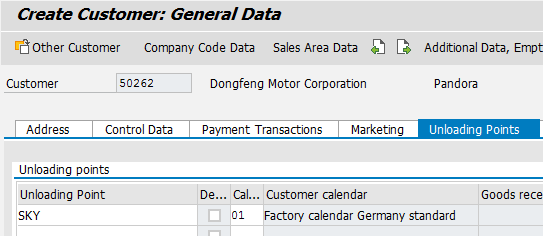
Now we will create customer for JIT proccess, t-code XD01, on the tab page “Unloading points” enter an unloading point:

On the “Sales area data > Shipping” select the indicator Order combination.

On the tab page Partner Functions enter a Partner Description. If you want to enter other goods recipients, make an entry in the table.

XD02

Then you have created a JIS system partner profile (t-code WE20).

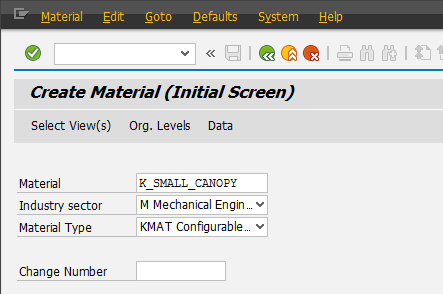
Next step – is to creating a couple of component group material (KMAT):


Read the rest of this article

JIT Humor

Receiving invoice via EDI: INCINV_CREATE

Basic types INCINV_CREATE01 / INCINV_CREATE02 – Incoming Invoice (IncomingInvoice) are available since EHP5.

Next MRM BAPI’es provides Invoice Verification:

  1. ALE_INCOMINGINVOICE_CREATE1
  2. BAPI_INCOMINGINVOICE_CANCEL – Invoice Verification: Reverse Invoice
  3. BAPI_INCOMINGINVOICE_CHANGE – Invoice Verification: Change Provisional Invoice
  4. BAPI_INCOMINGINVOICE_COMPLAIN – Invoice Verification: Display Letter of Complaint
  5. BAPI_INCOMINGINVOICE_CREATE – Invoice Verification: Post Invoice
  6. BAPI_INCOMINGINVOICE_CREATE1 – Invoice Verification: Hold/ Park/ Park As Complete/ Post Incoming Invo
  7. BAPI_INCOMINGINVOICE_DELETE – Invoice Verification: Delete Provisional Invoice
  8. BAPI_INCOMINGINVOICE_GETDETAIL – Invoice Verification: Display Incoming Invoice
  9. BAPI_INCOMINGINVOICE_GETLIST – Invoice Verification: List Incoming Invoices
  10. BAPI_INCOMINGINVOICE_PARK – Invoice Verification: Park Invoice
  11. BAPI_INCOMINGINVOICE_POST – Invoice Verification: Post Provisional Invoice
  12. BAPI_INCOMINGINVOICE_RELEASE – Invoice Verification: release invoice
  13. BAPI_INCOMINGINVOICE_SAVE – Invoice Verification: Flag Invoice for Background Processing

IncomingInvoice INCINV_CREATE IDoc will be passed to FM’s BAPI_IDOC_INPUT1 (Inbound BAPI IDoc: Individual Processing) or BAPI_IDOC_INPUTP (Packet Processing) which calls
IDOC_INPUT_INCINV_CREATE and subroutine CREATEFORMDATA1 (SAPLMRM_BAPI).

Sample IDoc INCINV_CREATE02 from quality system is listed below:

E1INCINV_CREATE-INVOICESTATUS = X


E1BP_INCINV_CREATE_HEADER-

INVOICE_IND	X  : Yes	Indicator: post invoice
DOC_TYPE	RE	Document Type
DOC_DATE	20181017	Document Date in Document
PSTNG_DATE	20181017	Posting Date in the Document
REF_DOC_NO	0180004672	Reference Document Number
COMP_CODE	215X	Company Code
DIFF_INV	0001000724	Different Invoicing Party
CURRENCY	RUB	Currency Key
CURRENCY_ISO	RUB	ISO currency code
EXCH_RATE	1	Direct Quoted Exchange Rate
GROSS_AMOUNT	1000	Gross Invoice Amount in Document Currency
CALC_TAX_IND	X  : Yes	Calculate tax automatically
PMNTTRMS	0001	Terms of Payment Key
BLINE_DATE	20181017	Baseline Date for Due Date Calculation


E1BP_INCINV_CREATE_ITEM-

INVOICE_DOC_ITEM	000001	Document Item in Invoice Document
PO_NUMBER	5500001890	Purchase Order Number
PO_ITEM	00010	Item Number of Purchasing Document
TAX_CODE	P2	Tax Code
ITEM_AMOUNT	3500	Amount in document currency
QUANTITY	35	Quantity
PO_UNIT	TO	Purchase Order Unit of Measure
PO_UNIT_ISO	PCE	Order unit in ISO code
PO_PR_QNT	35	Quantity in Purchase Order Price Unit
PO_PR_UOM	M	Order Price Unit (Purchasing)
PO_PR_UOM_ISO	PCE	Purchase order price unit in ISO code


E1BP_INCINV_CREATE_MATERIAL-

INVOICE_DOC_ITEM	000001	Document Item in Invoice Document
MATERIAL	A00006005110001	Material Number
VAL_AREA	215X	Valuation Area
DB_CR_IND	H  : Credit	Debit/Credit Indicator
QUANTITY	35	Quantity
BASE_UOM	M	Base Unit of Measure
BASE_UOM_ISO	PCE	Base unit of measure in ISO code
TAX_CODE	P2	Tax Code

Own customer exit for JITL (JITPP)

Defining the production info describes principles of using the table JITPP (“JIT : Production Information”) – repetitive manufacturing (A), stock transfer (B) and customer exit (Z). Table field is JITPP-BAFLU.

The transaction for controlling this behaviour is JITL:

The last one (customer exit) is very typical customer-function call, which is calls from functional module JIT03_DO_BACKFLUSH (CALL CUSTOMER-FUNCTION ‘009’), so function EXIT_SAPLJIT03_009 transmits into include ZXJIT0U19 next structures:

JITDIABACKF_IT STRUCTURE  JITDIABACKF  "Aggregate Information on Call Components
JITBACKFTMP_CT STRUCTURE  JITBACKFTMP  "Backflush Data Call Components
JITIT_IT       STRUCTURE  JITIT        "Table of Components Groups Involved
 
*Modifikation der Rückmeldedaten

JIT call main tables linking

Inbound:

Table JITMA (JIT Material Data)

JIT Material Customer Material Sales.Doc Item Base UoM
110063 DNFG 720000000034 30000001 10 PC
100900 DNFG 720000000098 30000002 10 PC
200014 DNFG 720000000011 30000003 10 PC

Table JITIT (Components Group)

Components group Call number CG type Call control External status Internal processing status
80111117 55000828 D051 0005 280 4000
80111118 55000828 D052 0009 280 4000
80111119 55000828 D053 0009 280 4000

Table JITHD (Call header)

Call number Customer Customer external JIT call number Sequence No. Call type Add.Info 1
55000828 DNFG 15000RASA37124 1882 S NB

Table JITCO (Call components)

Components group JIT Material Qty
80111117 110063 1
80111118 100900 1
80111119 200014 1

Outbound:
Inbound and outbound JIT-calls linked together (in case of) using field JITOIT-POSID.

Table JITOHD (Call header outbound)

Call key Call type External call number Sequence No.
404565 D (sum) / S (seq) 0000404565

Table JITOIT (Components Group JIT Outbound)

Call key Components group No. Internal Processing Status
404565 5000808746 0040
404565 5000808747 0040

Table JITOCO (Call components)

Components group No. Control cycle number Quantity
5000808746 88273 1
5000808746 119793 2
5000808747 133513 1

Table PKHD (Control cycle)

Control cycle number Material
88273 72110063
119793 72100900
133513 72200014

Insert math as
Block
Inline
Additional settings
Formula color
Text color
#333333
Type math using LaTeX
Preview
\({}\)
Nothing to preview
Insert